
Rust Cheats
Player and item ESP, wallhack, and triggerbot options show variant status before you launch. Confirm the current Rust build on rustcheatshop.com.
Product Overview
At a glance
Key capabilities
What rust cheats focuses on before you open the full module list.
Plus 11 additional modules in the operator portal. See the full list below.
Overview
Rust cheat suite
How modules, presets, and patch-day status checks fit Rust survival workflows.
rust wallhack 2026 style modules sit beside player ESP, item ESP, aimbot, aim assist, and triggerbot options for Rust, a survival game with constant PvP pressure.
Monthly ($35, 30 days) and lifetime ($150) plans are listed at checkout. Verify the current game build and variant status on rustcheatshop.com before purchase or launch.
Advertised modules include player ESP, item ESP, wallhack, aimbot, aim assist, and triggerbot (autofire when the crosshair aligns with a hitbox).
Variants and status
The line is offered in external, internal, script-based, and DMA (hardware-assisted) forms. Each variant is listed with a status label such as working, testing, or updating. Confirm current labels on rustcheatshop.com before you buy or launch.
Support and delivery
The provider lists 24/7 support through Discord and a ticket system, instant access after purchase, and a public status page for whether each product is working.
Plans and delivery
Choose monthly ($35 for 30 days) or lifetime ($150) at checkout. Instant access and loader delivery are listed after purchase. Check the status page on rustcheatshop.com before every session.
Updates and compatibility
Feature availability, detection status, and compatibility should be verified against the current Rust game version. Third-party tools can stop working after game or anti-cheat updates.
Modules
What's included
The rust ESP hack module list covers player and item ESP, wallhack, aim options, and triggerbot toggles in the operator portal.
- Player ESP: positions and distances for players and NPCs
- Player ESP: health and status (such as sleeping or wounded)
- Player ESP: equipped weapons and armor
- Player ESP: names or team indicators
- Item ESP: resource nodes, loot containers and crates
- Item ESP: deployables (tool cupboards, turrets, workbenches, traps)
- Item ESP: high-value weapons, armor, and explosives
- Wallhack
- Aimbot with recoil, bullet drop, and target movement compensation
- Configurable aimbot hitbox priority
- Aim assist (legit rust assist: smoother tracking and crosshair slowdown near targets)
- Triggerbot / autofire when aligned with an enemy hitbox
- External, internal, script-based, and DMA variant forms
- Per-variant status labels (working, testing, updating)
- 24/7 Discord and ticket support
- Instant access after purchase
- Public status page for product availability
Experience
Menu layers · After checkout
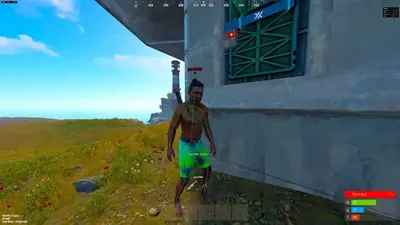
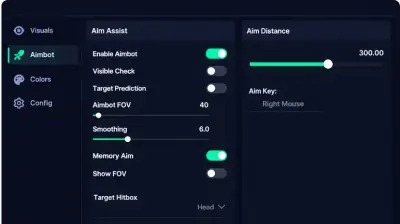
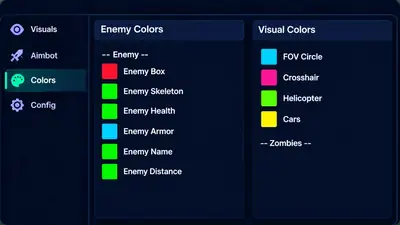
Screenshots above show the Rust menu layout; below is what each module group does and how portal access works after purchase.
In-game layers
- Layer A
Skeleton ESP overlay
Green wireframe skeleton and name tags on a player while Esp toggles stay visible in Rust.
- Layer B
Aimbot controls
Toggle aim assistance, set FOV and smoothing, and pick a target hitbox from the sidebar menu.
- Layer C
ESP color presets
Assign colors for enemy overlays, crosshair, FOV ring, and world object highlights.
More products
Pairs well with
Other tools from the same store, each with its own page and checkout.
- HWID Spoofer From $50 Designed to rewrite disk serials, MAC addresses, GPU IDs, and related fingerprints after a hardware flag, with trace cleanup bundled in one license. View details
- UGC From $35 Unban & Governance Control (UGC) is designed to ship stored appeal templates and automated dispute filings for limited logins on gaming, social, and marketplace platforms. View details
- Skin Changer From $35 Compact client designed to paint premium weapon skins, outfits, and knife variants on your display across major supported titles. View details
FAQ
Questions about this page
Answers tied to what you are reading. Visit the FAQ page for every topic.
Blog
Related guides
Filter by topic to find setup guides, feature deep-dives, and patch-day notes.
Choosing Rust cheat software requires more than comparing feature lists. Learn what to check regarding compatibility, functionality, support, pricing and account risks before making a purchase.
Rust ESP is a commonly advertised feature in third-party gaming software. Discover the different ESP categories, what information they claim to display and how they differ from traditional wallhack features.
Free and paid Rust cheat software can differ in availability, documentation, support and pricing. Learn what to compare and why neither option guarantees account safety.
Not every website advertising Rust cheats offers legitimate software. Learn how to recognize suspicious downloads, misleading product claims and common security warning signs.
A Rust EAC ban can prevent access to protected servers and carry permanent consequences. Understand the enforcement process, official appeal options and important restrictions.
HWID spoofers advertise changes to hardware identification information. Learn what this means, how compatibility claims should be evaluated and why spoofing does not remove an existing Rust ban.
Rust Community forum
Read discussion
Archived, read-only threads on loader setup, ESP configs, patch status, and HWID bans. Replies are closed.
- General Discussion What should you actually check before buying Rust cheats? There are loads of Rust cheat listings online, but what actually matters when comparing them? Features, compatibility, support or something else?
- Game Features Rust ESP, player ESP and loot ESP. Are these all separate features? I've seen different ESP categories advertised for Rust. Are player, loot and resource ESP actually different features or just different names for the same thing?
- General Discussion Are paid Rust cheats actually worth considering over free ones? Free downloads are everywhere, but paid software isn't automatically better either. What should players compare before choosing?
- General Discussion What does private Rust cheat actually mean? Is it just marketing? Every other product listing seems to use the word private. Does it have a meaningful technical definition or is it mainly promotional language?